
The Flat Panel Antenna Mount is for use on “pizza box” style and “diamond” shaped flat antennas. Using the AAT with this mount will allow for measurement of azimuth, tilt (aka elevation) and roll (plumb). These antennas are used in point-to-point, point-to-multipoint, and RF flat panel antenna systems.
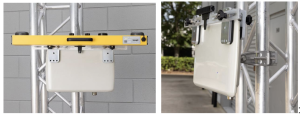
Flat Panel Antenna Mount on Antenna (with and without AAT)
- Choose Antenna Configuration (Mounted Horizontally or Mounted as a Diamond)
- For Flat Panel Antennas Mounted Horizontally:
- Determine the best location for the mount by examining the antenna to determine its flatness across the front as well as its thickness from front to back.
- Open the Bracket Clamp as wide as possible by using the thumbscrews.
- Determine the correct Sliding Mount bracket position by centering the mount on the front of the antenna so that the any error from curvature on the face of the antenna will be eliminated
- Slide the mount over the antenna so that the mounting brackets straddle the antenna. Make sure the antenna is centered on the front of the antenna and the antenna mount is level compared to the antenna housing. Tighten the mount brackets to secure the mount.
- Attempt to wiggle mount to make sure it is secure on the mount.
- Proceed to Step 2 below
- For Diamond Mounted Antennas:
- Determine the best location for the mount by examining the antenna to determine its flatness across the front as well as its thickness from front to back.
- Open the Bracket Clamp as wide as possible by using the thumbscrews.
- Slide the mount over the antenna so that the mounting brackets straddle the antenna.
- Determine the correct Sliding Mount bracket position by centering the antenna on the front of the antenna so that mount is level. Make sure the Sliding Bracket Clamps are in the same position on both sides of the mount (same amount of open slot is showing on both sides). Make sure the point of the diamond is equally spaced between the two mounting brackets. Tighten the mount bracket thumbscrews to secure the mount.
- Attempt to wiggle mount to make sure it is secure on the mount.
- Proceed to Step 2 below.
- For Flat Panel Antennas Mounted Horizontally:
- Secure the AAT to the Flat Panel Antenna Mount
- Attach the AAT to the Flat Panel Antenna Mount mounting rail using the grip plate on the back of the AAT. User should feel AAT “click” into position. Tighten AAT thumbscrews to secure AAT.
- Secure AAT and Air Mount to stable structure using safety lanyard to prevent potential falling hazard.
- Measuring, Capturing and Reporting Alignment Data
- Connect to the AAT in the standard way by powering on the AAT and connecting using WiFi or USB-C cable (see Quick Start Guide for detailed instructions). The WiFi connection can be made using the Android App (preferred) or by using WiFi and a browser.
- On the AAT Measure Only page, set Orientation to “Faces Front” and click Apply.
- Perform antenna adjustments to match desired alignment and save results.